Changelog
What's new in Lkz Yield?
A running log of the features and improvements we've shipped — newest first.
- ExperimentsLatestMajor
Run A/B tests on your ad setup
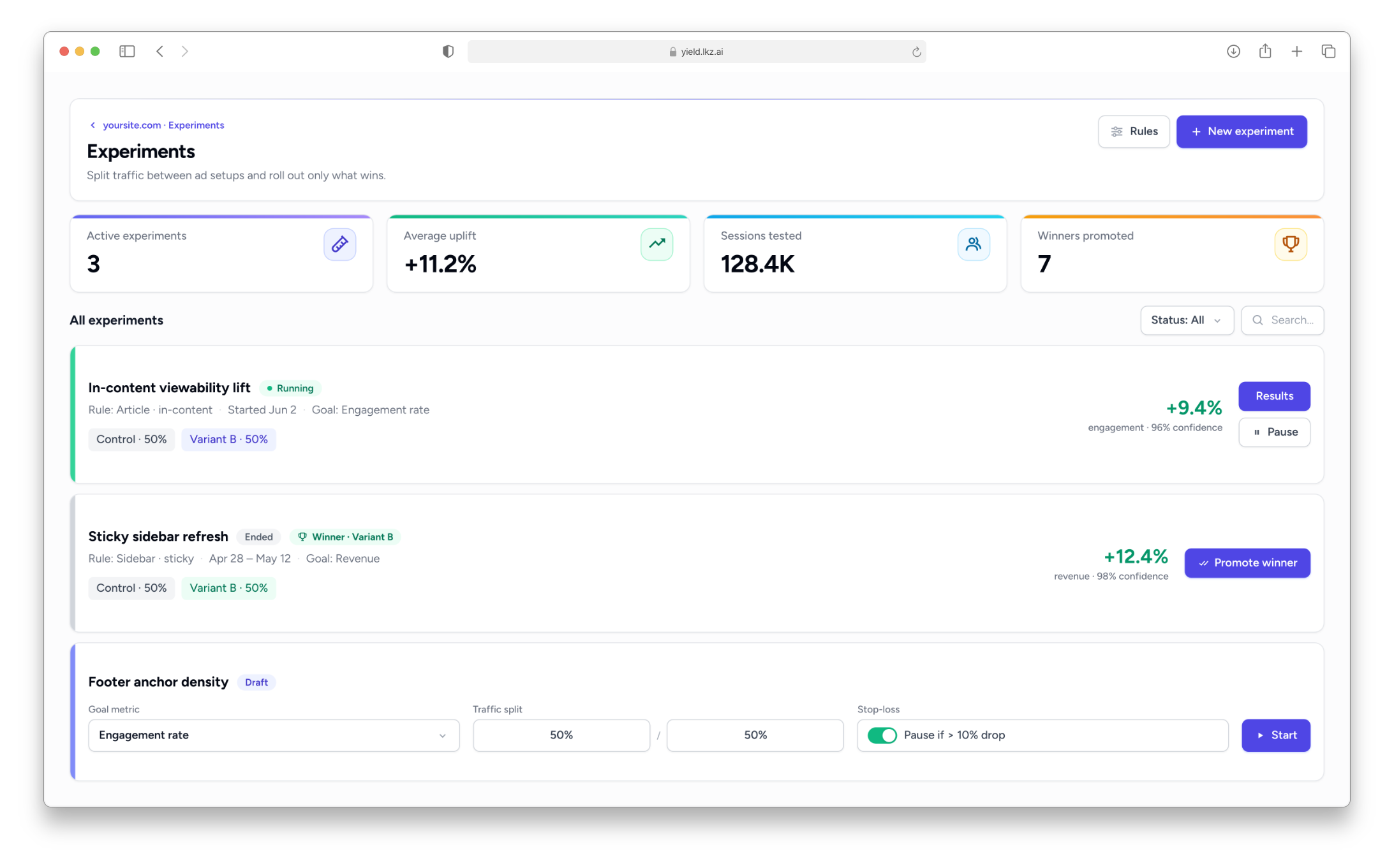
A new experiments module lets you put two ideas head to head on a real rule and let your traffic pick the winner.
- Test any rule. Attach an experiment to any rule — even your default — and visitors are split into variants automatically.
- Change exactly what you're testing. A variant can adjust the rule's actions, switch managed placements on or off, and fine-tune placement settings.
- Know when you have a winner. Each variant gets its own performance read-out with a confidence label, and a Promote button unlocks once there's enough traffic to call it.
- Stop a bad test early. An optional guardrail pauses an experiment on its own if a variant slips too far behind, with the reason shown.
- Platform
A guided start for new publishers
Getting set up is now a clear, friendly path.
- A setup checklist. We walk you through sharing your Google details, adding your first site, and accepting your invite — and step aside once you're up and running.
- Connect with Google. Link your Google Ad Manager account and pick your network from a searchable list, or enter the details yourself.
- Nothing slips through. Sites you add before your account is ready wait safely with a clear status and go live the moment setup is complete.
- Workbench
Place ads by dragging them onto your page
Page mode in the AI Workbench gains a hands-on builder, so when you know exactly where an ad should go, you can just put it there.
- Drag to place. Drop a “+ Ad” chip straight onto your page preview, or drag an existing ad to move it.
- See it before it's live. A clean outline shows exactly where the ad will land — no spawned ads, no page jumping around.
- Scope at a glance. Each ad shows whether it applies to all similar pages or just this one, switchable with a tap — and everything still goes through the same review-and-publish step.
- Analytics
See how your ads actually perform
Analytics grows beyond audience into a full view of how your ads are delivering.
- Flip to ad delivery. A new toggle switches your Analytics between audience and ad metrics — fill rate, viewability, requests per pageview, and rewards.
- Spot missed revenue. Revenue-leak detection and a viewability-versus-demand chart highlight where there's money left on the table.
- Drill into a slot. Open any ad slot to see its fill and viewability alongside the revenue tied to it.
- Compare with similar pages. See how a page's earnings stack up against the typical page like it.
- Platform
Faster, smoother dashboards and reports
Your Analytics, Dashboards, and Reports now feel instant.
- Pages paint right away. The page frame shows immediately and content streams in with tidy placeholders, instead of waiting for everything to load at once.
- Fresh without refreshing. Analytics updates on its own as new data arrives — no manual reloads.
- Rules
A clearer rule editor
The “what changes when this rule matches” section was rebuilt around cause and effect.
- Related settings stay together. Turning a setting on expands it in place and tucks the options it unlocks right underneath.
- Know what a toggle does first. A setting that's off tells you what it would reveal before you flip it.
- Live as you edit. Every control reflects its real value as you work, and any setting you've changed is clearly marked with a one-tap reset.
- Kaz
A faster Turbo mode for Kaz
- Turbo answers. A new Turbo speed handles questions and advice instantly and only brings in the heavier model when there's real work to do — creating, changing, or archiving. Choose Turbo, Fast, or High.
- Clearer when something goes wrong. If Kaz can't finish, the message is now clear and explains the issue or follow-up.
- Workbench
The AI Workbench on your phone
Both Kaz chat and the page preview now work on mobile, with slide-in panels, full-width previews, and controls you can actually reach. Desktop is unchanged.
- Platform
Friendlier emails when your site's status changes
Site approval and rejection emails were redesigned to match the dashboard. Approvals celebrate the news and walk you through going live; rejections explain calmly what to change, with support a click away.
- Platform
A lighter, cleaner look across the app
- Brighter, flatter pages. Gray header bars and all-caps labels give way to clean white cards and plain sentence case across dashboards, reports, settings, tags, and rules.
- Fill rate for admins, too. The match-rate (“Fill”) column is now available in admin reports.
- Rules
Sharper page-type detection
We're much better at recognising what each page is — article, listing, homepage, legal, and more — so your rules can target page types reliably and your analytics group cleanly. Rules now use a single, clear “Page type” condition in place of two overlapping ones.
- Reporting
Richer, interactive charts
Charts across your reports, Analytics, and dashboards were rebuilt to do more.
- Explore as you go. Drill down, zoom, and toggle series right inside the chart.
- Compare periods. Overlay current versus prior periods to see exactly what changed.
- Smoother with big data. Large datasets render faster and cleaner.
- Platform
A cleaner way to get around
Navigation moves to a collapsible left sidebar in place of the old top bar.
- Collapse it to focus. Shrink the sidebar down to an icon rail — it remembers your choice.
- Built for mobile. A slide-in menu and quick dashboard access on smaller screens.
- Account tucked away. Your profile and log-out now live in a tidy footer menu.
- Kaz
Kaz keeps getting better
Two upgrades make Kaz easier to follow and sharper with its advice.
- Watch Kaz work. While it works through a plan, Kaz now narrates each step in plain language — so the longer pauses become readable progress instead of a silent “Working” badge.
- Focused on your top pages. Kaz now weighs your real traffic and revenue when mapping a site, so its suggestions center on the pages that actually matter.
- Platform
A cleaner, more consistent workspace
Every dashboard page — publisher and admin — now shares one refined layout, header style, and button set, with more room to work.
- One consistent look. Page headers and buttons are unified across the app, so everything feels of a piece.
- More breathing room. Content stretches wider on large screens.
- Better date controls. Dashboards now use the same polished date-range picker — presets and custom ranges — as Reports.
- Reporting
More detail in your reports
Reporting now recognizes more of your traffic with support for a larger set of devices and countries.
- WorkbenchMajor
Introducing the AI Workbench
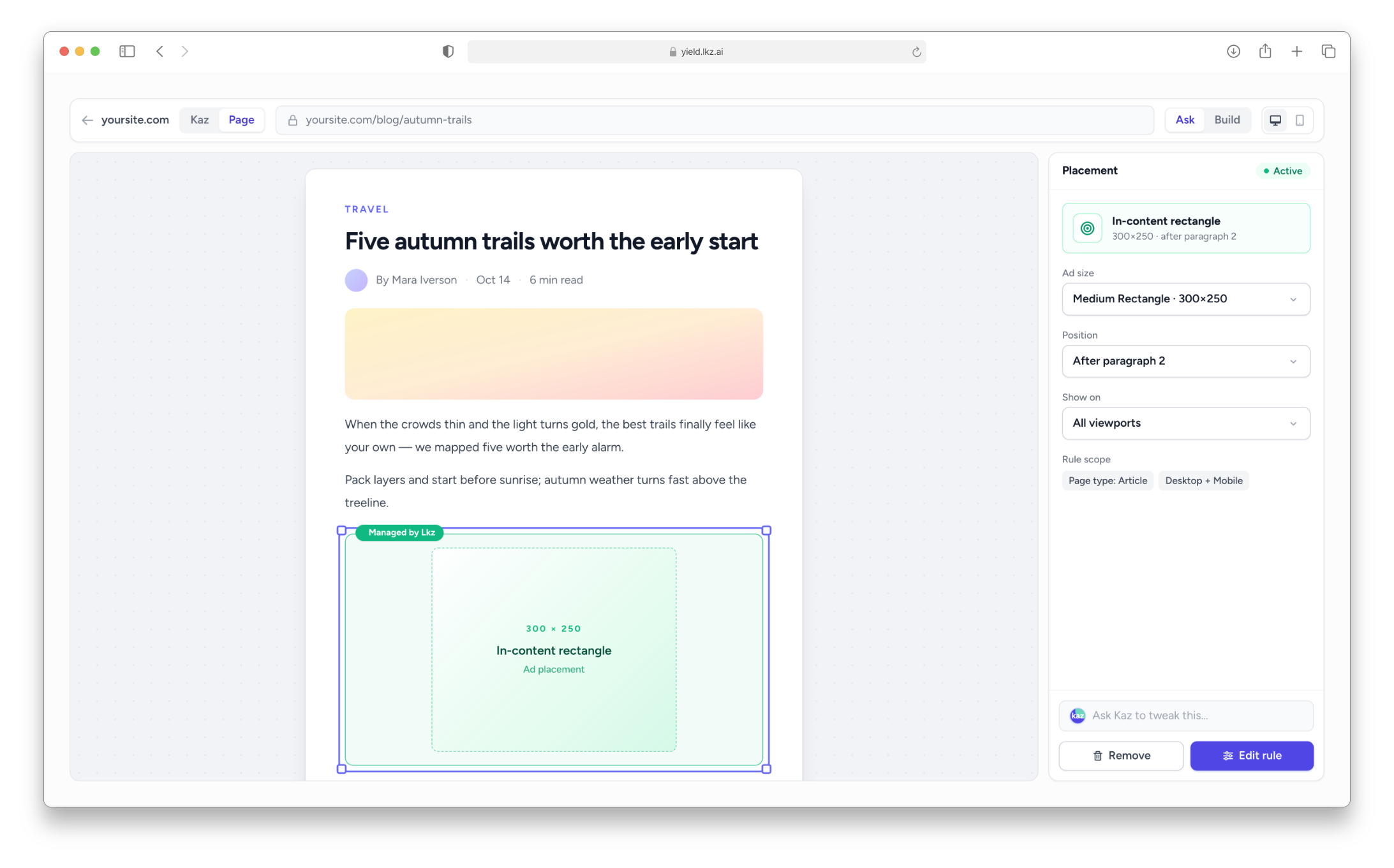
A major new way to optimize your sites arrives in early access: the AI Workbench studies a page's layout, recommends where ads should go, and can generate the rules to put them there.
- It understands your pages. The workbench captures and analyzes your site's structure to find strong placement opportunities.
- Managed placements, suggested for you. AI-generated ad slots that target the right spots and render responsively.
- Preview before you commit. See proposed placements on a live preview of your actual page before anything goes out.
- Review on your terms. Step through proposals in a threaded review and approve them one at a time or all at once — then keep iterating. Open the workbench from any site page.
- Kaz
Plan your ad setup with Kaz
The workbench gains Plan mode — a conversation with Kaz, your AI assistant, who works through your goals with you, asks clarifying questions, and proposes placements you can approve right in the chat.
- A plan that sticks. Your plan is saved as you go, with changes tracked and approved as you refine them.
- Backed by evidence. Inline citations link each proposal to the pages, rules, and reports behind it.
- Bring in references. Pull saved reports and specific pages into the chat to ground the plan in your real data.
- Platform
Sign in with Google
You can now sign in with Google and link a Google account to your profile — and connect your Google Ad Manager network the same way.
- Reporting
Your reporting, now programmable
Reporting opens up for programmatic and shareable access.
- API access with scoped keys. Create and revoke API keys from your profile — limited to just report reading or saved-view management — and pull your reports over the new reporting API.
- Share a report by link. A report's setup now lives in its URL, so you can hand a teammate the exact view you're looking at.
- Connect it to AI tools. A new reporting connection lets AI assistants query your reports directly.
- Delivery
Custom ad size profiles
Define your own reusable ad size profiles for any site or app.
- Build once, reuse everywhere. Create size sets with responsive breakpoints, then apply them across your tags and placements.
- Find sizes fast. A searchable picker makes choosing dimensions quick.
- Platform
Stronger account protection
We added bot protection to sign-up and password reset and layered smarter rate limits on login, keeping your account safer without getting in your way.
- Delivery
Focused Banners for display tags (Beta)
A new beta option for display tags that pauses surrounding content while an ad is engaged — keeping attention where you want it. Available from the refreshed tag setup screen.
- Kaz
Kaz gets faster and easier to follow
Kaz gets a big upgrade to how it works alongside you.
- Replies that stream in. Kaz's responses appear live as they're written, so there's no blank wait between turns.
- One place to review. A pending-proposals inbox groups everything Kaz suggests — approve items one by one or all at once, with detailed review drawers and inline placement editing.
- Jump straight to the evidence. Quick-action pills under each reply take you to the exact report, rule, or placement it touched — and you can export any cited report as CSV, XLSX, or PDF.
- More natural conversations. Kaz can ask focused clarifying questions and work from what you want without needing to capture a page first.
- Reporting
Reporting grows up
Reporting becomes one unified workspace, with delivery and exports built right in.
- Scheduled delivery. Have a saved report emailed to you on a recurring cadence.
- Exports without the wait. Large or PDF exports run in the background and arrive by email with a secure download link; smaller ones still download instantly.
- Pull it via API. A built-in request explorer generates the endpoint, body, and ready-to-run cURL for any report.
- Better date control. A presets-plus-custom date-range picker, drilldown breadcrumbs, and a compare baseline.
- AnalyticsMajor
Your traffic, in real time
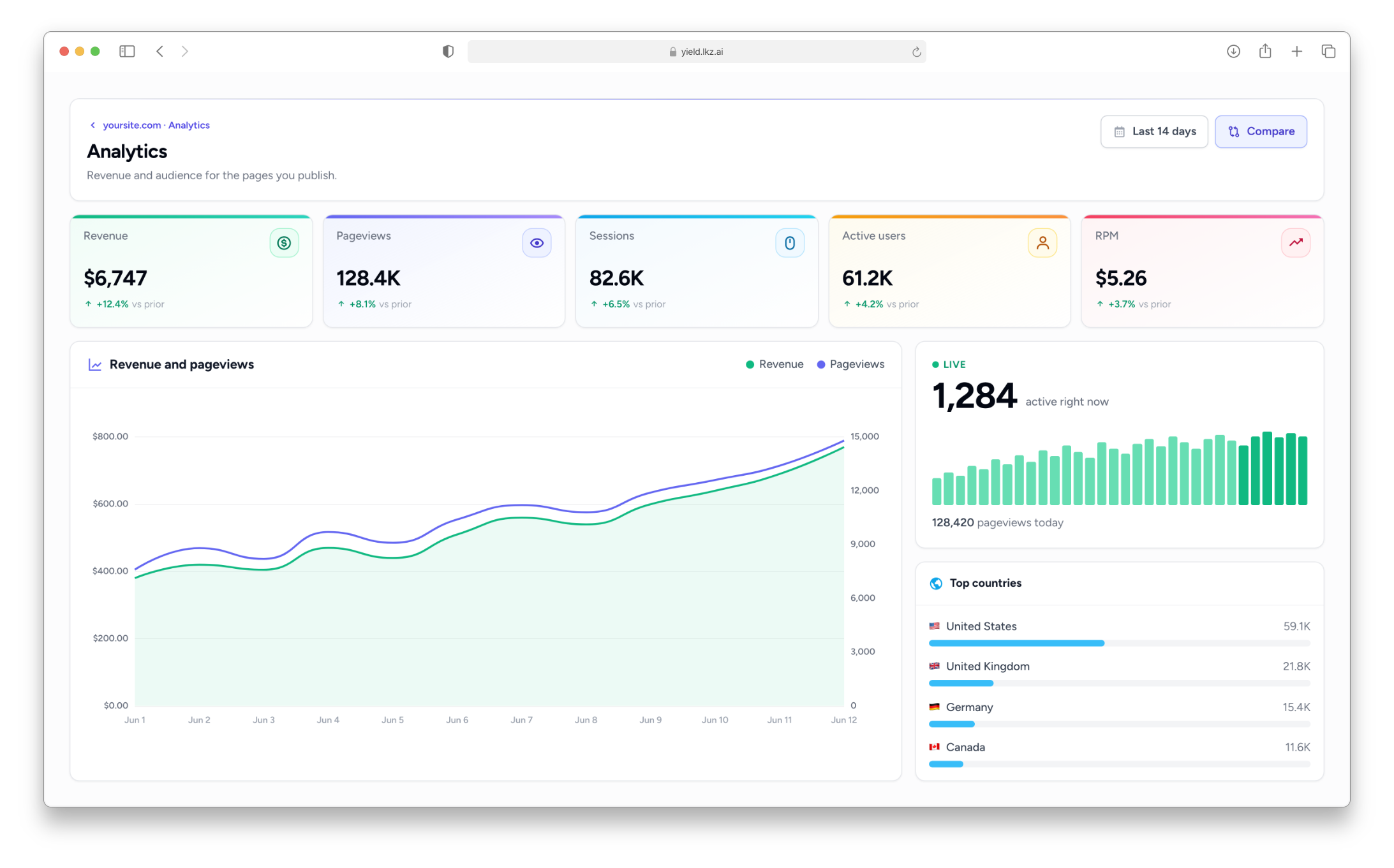
A brand-new Analytics dashboard gives you a first-party view of how your sites actually perform — built on Lkz's own analytics rather than third-party tracking.
- A live pulse. A real-time tile shows pageviews updating by the minute.
- Find the revenue you're missing. A monetization gap finder and top-URL breakdowns surface where there's room to grow.
- Slice it your way. Trends, country, device and subdomain breakdowns, an hour-of-day heatmap, “new URLs today”, and per-URL drill-in.
- Delivery
Brand your rewarded ad prompts
Make the rewarded ad experience your own instead of a generic pop-up.
- Design it to match your site. Set the icon, heading, text, button, and accent color, and save reusable designs on a new Appearance page.
- Let visitors opt out. Optionally allow closing the rewarded prompt without watching.
- Apply per rule. Choose which design shows for which targeting rule.
- Delivery
Even lighter ad tags
We shrank the ad code delivered to your sites even further — generated bundles are now roughly 40% smaller, for faster page loads.
- Rules
A clearer way to control your ad rules
Site rules got a ground-up redesign around a simpler idea: every setting has a sensible default, and your custom rules only ever change what you actually want to be different — no more guessing what a rule is really doing.
- Default vs. your change, at a glance. Each setting shows its baseline and flags when a custom value happens to match the default anyway, so you never end up with rules that quietly do nothing.
- Drag to reorder. Set rule priority by dragging, instead of juggling priority numbers.
- Context-aware options. Related settings now appear only when they're relevant — for example, reward-locker options show up once you choose a lockable rewarded format — and sit neatly under the setting they belong to.
- Live feedback while you edit. Loading cues, instant toggles, and a sticky rule title that follows along as you type.
- Rules
Preview how a rule will treat a visitor
Before you commit a rule, you can now simulate a visitor and see exactly which rules and actions would apply to them.
- Test any scenario. Paste or build a URL and visitor context, then watch the per-condition breakdown and the resulting actions.
- Save scenarios. Keep your common test setups as presets to re-run whenever you change a rule.
- Platform
Faster, more hands-on support
We added behind-the-scenes tooling that lets our team step into your view to review your performance and spot issues directly — so when you reach out, we can diagnose and resolve things noticeably faster.
- Delivery
A refreshed Sites and Tags workspace
Your Sites and Tags pages were rebuilt into a cleaner, faster space for managing your inventory.
- Everything about a site in one view. Approval status, open issues, and setup details now sit together on the site overview.
- Simpler tag setup. Clearer placement and embed code with one-tap copy.
- ads.txt, sorted. A dedicated page to check, verify, and copy your ads.txt lines.
- Platform
Bring your mobile apps into Lkz Yield
Lkz Yield expands beyond websites — you can now add and manage mobile apps right alongside your sites.
- A home for your apps. Add apps with their store details and IDs, manage app tags, and grab SDK snippets, all in one new Apps area.
- One unified inventory. Apps and sites share the same approval and management flow, so there's nothing new to learn.
- Platform
A new publisher dashboard
Your dashboard got a full redesign built around the numbers you check first.
- The essentials up top. Key metrics as quick-read tiles, with a performance trend chart right below.
- Find a site fast. Search your inventory straight from the dashboard.
- Better on mobile. Spacing and layout refined across the experience.
- Reporting
Reports, redesigned
Reports moved into a cleaner workspace with more control over how you slice your data.
- Save your views. Keep frequently used report setups and switch between them from a Views menu.
- Organized filters. Collapsible, card-style filter sections that also work well on mobile.
- Clearer charts. Group by a primary and secondary dimension, with combined labels so the data reads at a glance.
- Platform
A clearer Payments page
Your Payments page was rebuilt so where you stand is obvious at a glance.
- Status front and center. A summary strip shows total paid, what's pending, and your latest payment.
- Full history. A ledger-style view of every past payment.
- A tidier profile, too. Account settings were reorganized into a cleaner, icon-led layout.
- Platform
A fresh sign-in experience
We redesigned the login, registration, and password-reset pages for a cleaner first impression.
- Delivery
Lighter, faster ad tags
We trimmed the ad code delivered to your sites so a page only loads what it actually needs — keeping your pages quick.
- Delivery
Video ads arrive
On top of the launch, video joins the lineup: run in-stream and out-stream video units on your sites, with a player tuned to keep fill high and the viewing experience clean.
- PlatformMajor
Lkz Yield is live
Lkz Yield is out of beta and open to publishers — bringing your sites, ad setup, and billing together in one dashboard.
- Your billing in one place. See your finalized earnings from previous months without leaving the platform.
Keep climbing
Want all of this working on your sites?
Everything above ships into one platform — your inventory, rules, reporting, and payouts in a single place.